Online beat maker for beginners. No download, no account needed to start.Online beat maker for beginners. No download. No account needed.
Open the music studio and start creating beats in seconds.
Collaborate with friends in real-time.
or join a friend
Perfect if you're just starting out
Joined by 0 users
i love using this site
J. M. on Feedback form
Wonderful app!!!! I had so much fun experimenting with it!
C. R. on Feedback form
I'm a black musician so this is a great experience for me
D. A. on Feedback form
I just really like the overall quality and this is actually realistic like with the 8 counts and sounds I really like it!
T. W. on Feedback form
its perfect
K. L. on Feedback form
IT Is amazing and kind of confusing
M. B. on Feedback form
great for beginners
S. P. on Feedback form
It's really fun and easy to make the beats
A. V. on Feedback form
its amazing
N. O. on Feedback form
pretty good site and its really simple
L. H. on Feedback form
pretty fun but not easy to grasp
R. G. on Feedback form
best music i've ever heard
E. K. on Feedback form
i love using this site
J. M. on Feedback form
Wonderful app!!!! I had so much fun experimenting with it!
C. R. on Feedback form
I'm a black musician so this is a great experience for me
D. A. on Feedback form
I just really like the overall quality and this is actually realistic like with the 8 counts and sounds I really like it!
T. W. on Feedback form
its perfect
K. L. on Feedback form
IT Is amazing and kind of confusing
M. B. on Feedback form
great for beginners
S. P. on Feedback form
It's really fun and easy to make the beats
A. V. on Feedback form
its amazing
N. O. on Feedback form
pretty good site and its really simple
L. H. on Feedback form
pretty fun but not easy to grasp
R. G. on Feedback form
best music i've ever heard
E. K. on Feedback form
Make Beats with the Beatmaker
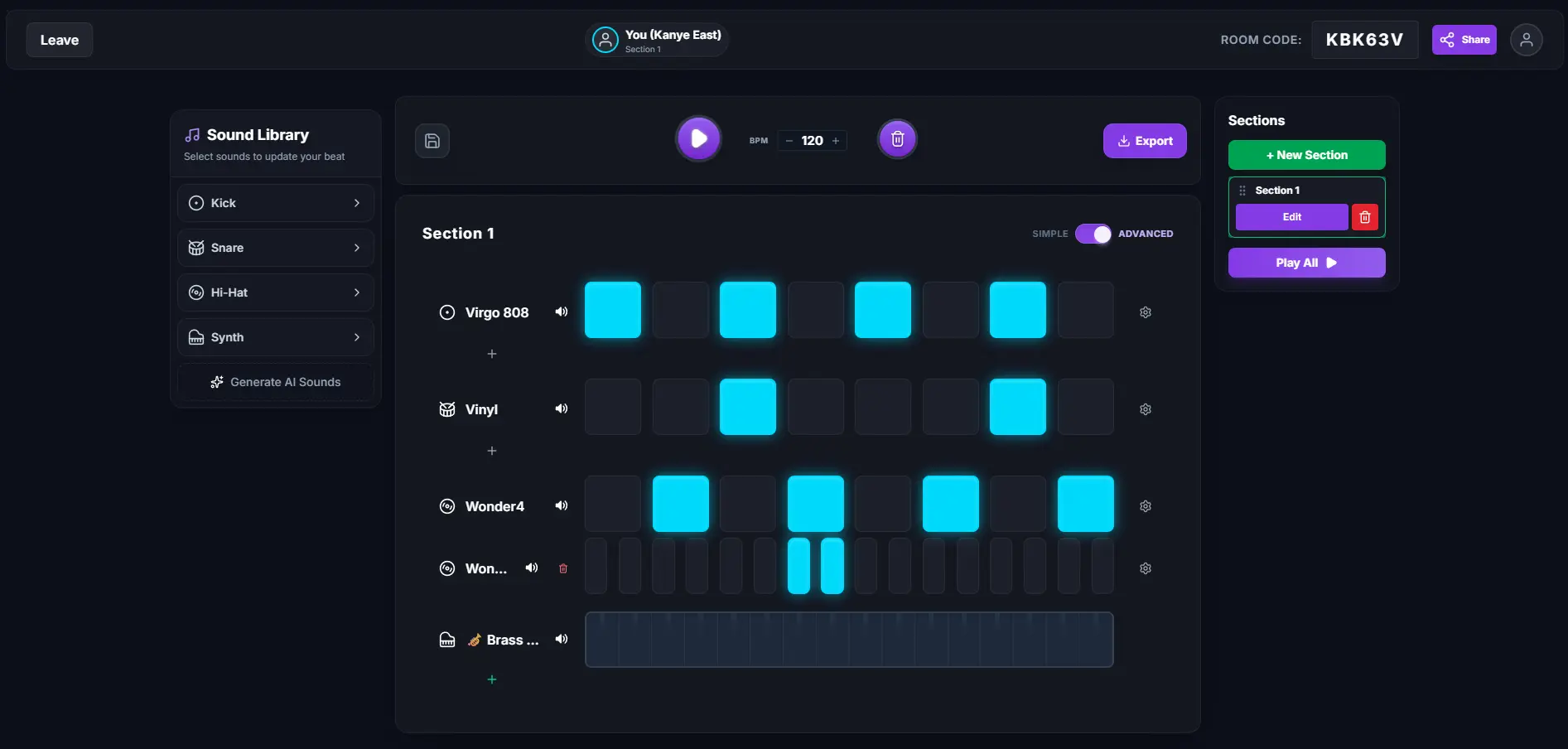
Creating beats is as simple as building with blocks. Choose from over 400 sounds, pre-made loops, and melodies, click a few cells on the grid, and you will have a punchy beat in seconds. Perfect for beginners—just pure fun.
Send a link to your friends and start producing together in real-time. Just like Google Docs but for music making, you can layer instruments, edit drum patterns, and hear each other's changes with zero delay.
Play the keys with your mouse, your touchscreen or your computer keyboard, then hit record. Everything you play drops straight into the piano roll with one click, where you can move, stretch or delete any note. Switch instruments in seconds and play your favourite tunes.
Record yourself singing, rapping, or talking right in the browser — a normal laptop mic is enough. Then transform it: pitch shift for a deeper voice, reverb, echo, a telephone filter, or a one-click pack like Space Rap or Cyborg Robot. One click and the vocal is in your beat.
Every sound on the grid gets its own effects panel. Open it from the gear icon and shape that one track: reverb for space, a filter to sweep it open or shut, delay for echo, distortion for grit, and swing to loosen up the timing. Set its volume, and switch it between 8-beat, 16-beat, or triplet steps.
Generate with AI
Supercharge your creativity with AI. Generate custom samples, unique loops, catchy melodies, and vocals instantly, then integrate them straight into your beat grid to make them your own.
Why beginners and music creators choose Make a Beat
Whether you're sketching your first drum pattern or arranging a full multi-section track, Make a Beat gives you the tools of a professional digital audio workstation (DAW) in a zero-friction browser experience.
Built for beat sketching
Sometimes you just need to get an idea down fast. Make a Beat is designed for exactly that — open your browser, click a few cells, and your beat is playing. No project setup, no loading libraries, no 5-minute boot times. When your sketch is ready, export to MIDI and continue producing in FL Studio, Ableton, Logic, or any DAW.
The only multiplayer beat maker
No DAW lets you share a link and have someone join your session in seconds. Make a Beat is genuinely multiplayer — everyone sees changes in real-time, everyone can add instruments and patterns. Perfect for remote production sessions, music classes, or just having fun making beats with friends.
Learn music production visually
The grid-based sequencer makes rhythm and composition visual and intuitive. See exactly how kick, snare, and hi-hat patterns interlock, and use the piano roll to understand melody and harmony. It's the ideal music maker for teachers, students, and self-learners — a clear stepping stone before moving to complex digital audio workstations.
AI-powered sound creation
Stop digging through sample packs. Generate custom, one-of-a-kind sounds with our AI sound engine. Describe the sound you want and get a unique sample in seconds. Layer it into your beat and export. Your productions will sound like nobody else's.
Enough scrolling, let's get started!
Beat Maker FAQ
Fast answers for producers, beginners, and collaborators.
What's the fastest way to start making a beat?▼
Open make-a-beat.com with no download or account needed. Click cells on the grid to place kick, snare, and hi-hat sounds, use the piano roll for melodies, then export as WAV or MIDI.
Is Make a Beat free to try?▼
Yes. Core beat making is free — open the browser and start sketching beats instantly. Optional premium features unlock advanced tools and AI sound generation.
Can I make beats online with friends?▼
Yes. Make a Beat supports real-time collaboration. Create a session, share the link, and produce together with live updates.
Do I need to download any software?▼
No. This online beat maker runs entirely in your browser on desktop, tablet, and mobile.
Can I export beats to FL Studio or Ableton?▼
Yes. Export as MIDI for FL Studio, Ableton, Logic, and other digital audio workstations, or download a high-quality WAV file.
Is Make a Beat good for beginners?▼
Yes. Make a Beat is designed for beginners — no music theory required. The visual sequencer and chord helper guide you through rhythm, melody, and harmony at your own pace.
What free music tools do you offer besides the beat maker?▼
You can also use our Pitch Detector, Find Key of Song tool, Vocal Pitch Detector, Stem Splitter, and Rap Battle pages.